 Template
The best JEFIT alternative for running a real program
Looking for a JEFIT alternative? See how JEFIT and Template Trainer compare on progression, programs, price and everyday logging, and which one fits you.
JEFIT is one of the longest-running workout apps, and it does a lot: a 1,400+ exercise library with videos, a routine database, watch apps, body charts and, lately, an AI that suggests your next weight. People usually go looking for a JEFIT alternative because of that same breadth. The screens are busy, the free version pushes upgrades, and the smartest features sit behind Elite. If what you really want is to run a proven program and have it tell you exactly what to lift, a smaller, focused app can suit you better. Here's an honest comparison.
JEFIT vs. Template Trainer at a glance
| Template Trainer | JEFIT | |
|---|---|---|
| Price | Free, no paid tier | Free Basic plan; Elite is $12.99/month or $69.99/year (US) |
| Ads | A small sponsored card on some screens, never during a workout | Reviewers report many ads in the free version; Elite removes them |
| Exercise library | Your own library, with demo links | 1,400+ exercises with HD videos and animations |
| Ready-made plans | 31 classic programs, each with its progression built in | A large routine database tagged Free or Elite |
| Next session's weights | Set by the program's rules, which you can read and edit | AI suggestions from your logs; the full AI features need Elite |
| Muscle balance | Planned sets per muscle, before you start a program | Muscle map and recovery charts |
| Circuits | Circuits with a built-in work and rest timer | Supersets and a rest timer |
| Watch apps | No | Apple Watch and Wear OS |
| Apple Health | No | Yes |
| Where it runs | Any browser on phone or computer; installs to your home screen; logs offline | iPhone and Android apps, plus a web site with routines and reports |
JEFIT details come from its own pages, app store listings and the reviews listed under Sources, checked on the date at the top of this page.
Rules you can read vs. a suggestion you have to trust
JEFIT's newer AI looks at your past logs and suggests what weight and reps to lift next, and JEFIT says you can override any suggestion. That's helpful, but it's hard to know why it picked a number, and its own guide says the full AI features need Elite.
Template Trainer takes the old-school approach that strength coaches have used for decades: the program decides, by rules written down in advance. Each program in the library comes with its rules, and you can open any of them and see exactly what will happen. For example, a double progression rule for dumbbell presses reads: "If Incline Dumbbell Press on day 2 had at least 12 reps on all working sets, add 5 lb to working sets and set reps to 8." You hit the top of the range, the weight goes up and the reps reset. Miss it and you stay put until you earn it.
Because the rules are plain, you can change them. Want smaller jumps, a deload after two misses, or a percentage of your one rep max like 5/3/1? Edit the rule, not your notes app. And every part of it is free.
How it works in Template Trainer
Here's a week with a program, using PHUL as the example.
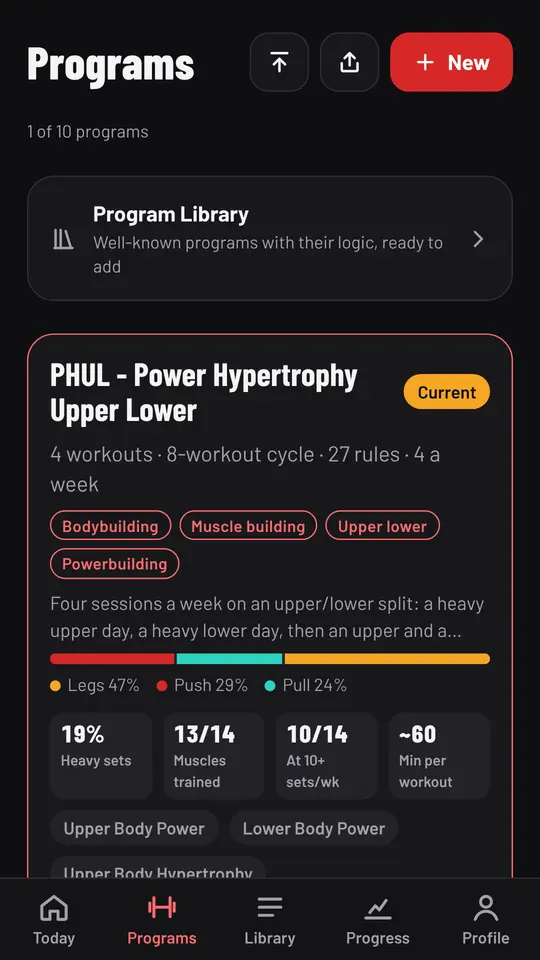
- Choose a program and see what it does. The Programs screen shows each program's workouts, cycle length and number of rules, plus a muscle balance bar and stats like the share of heavy sets.
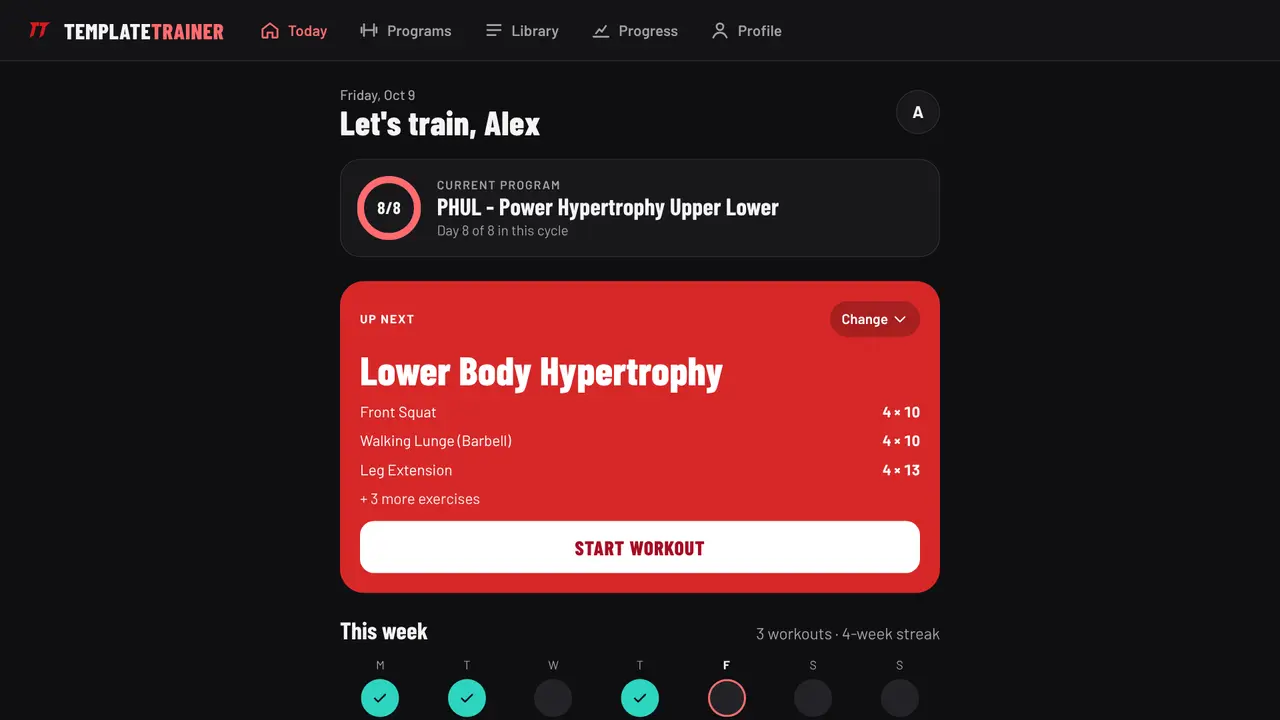
- Open Today. It shows your current program, where you are in the cycle and the next workout, with the weights already worked out. Hit Start workout.
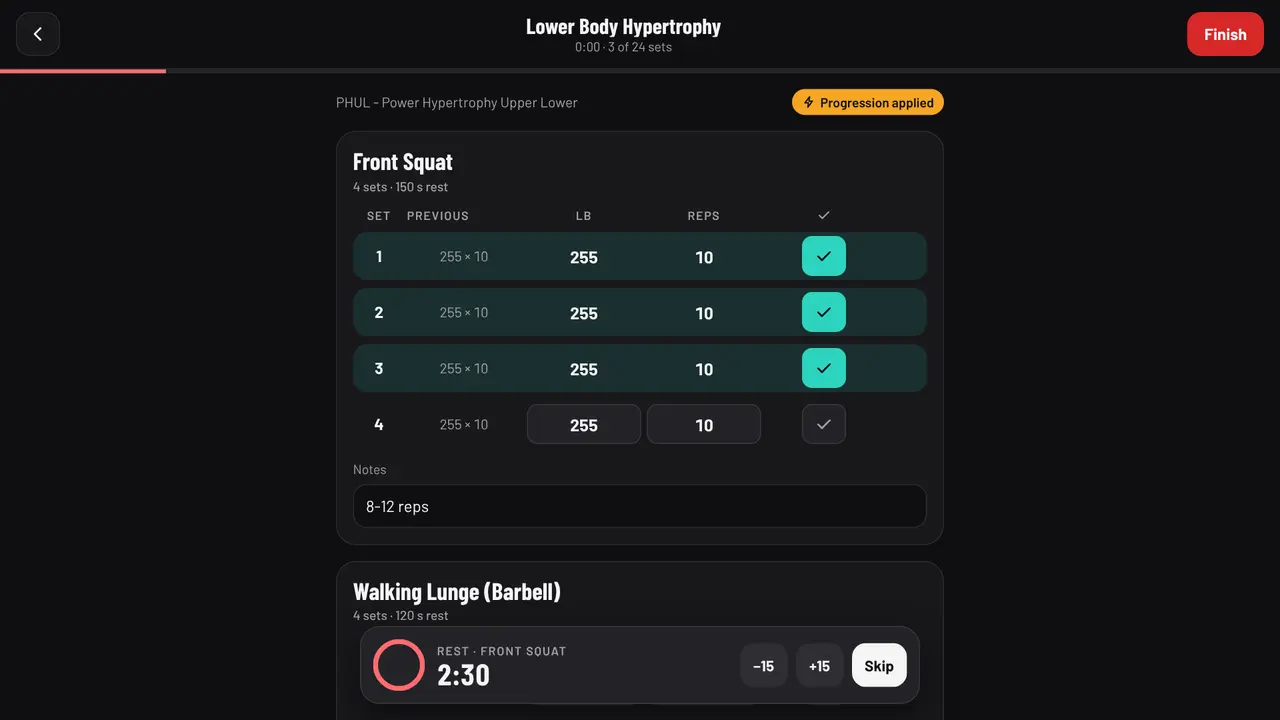
- Train. Each exercise lists last time's numbers next to today's. Tick a set and the rest timer starts with the program's rest. "Progression applied" tells you a rule changed today's weights.
- Repeat. Next time, the rules look at what you did and set the new weights. You never have to remember them.
A calmer screen to train from
JEFIT's own guide calls its interface information-dense, and reviewers on the app stores mention sync problems between the app, the web and the watch. Template Trainer keeps the workout screen to what you need between sets: the exercise, last time's numbers, today's weight and reps, a tick box and the rest timer. There's no feed, no upsell and no ad on that screen.
It also works offline. Log a whole session in a basement gym with no signal and it syncs when you're back online.
When JEFIT is the better choice
JEFIT is the better pick if:
- You want video demos for every exercise. Its 1,400+ exercise library with HD videos is a real strength, especially for beginners learning machines and free weights. Template Trainer links to demos but doesn't host its own videos.
- You log from your wrist. JEFIT has Apple Watch and Wear OS apps with live sync and heart rate. Template Trainer has no watch app.
- You want Apple Health sync. JEFIT syncs with Apple Health; Template Trainer doesn't.
- You like browsing thousands of routines. JEFIT's routine database is far larger than Template Trainer's 31 programs, though many are user-made and some need Elite.
- You want the app to adapt for you. If you'd rather not think about rules at all, JEFIT's AI plan adjusts as you log.
Who should switch
Template Trainer is a good fit if you:
- want to run a proven program, like GZCLP, 5/3/1 or PHUL, and have every session's weights set for you,
- prefer rules you can see and change over suggestions you can't explain,
- don't want to pay for analytics: the estimated one rep max charts, records and DOTS score are free,
- train in places with bad signal, or on a laptop as well as a phone.
You can start free in a minute and run it alongside JEFIT for a week before deciding.
Frequently asked questions
Is there a free alternative to JEFIT?
Yes. Template Trainer is free with no paid tier, including all 31 programs, progression rules, charts and CSV export of every set. JEFIT also has a free Basic plan; Elite adds its full AI features, advanced analytics, watch support and no ads.
Can I import my JEFIT history into Template Trainer?
No. Template Trainer can't import another app's history. Pick the program you're running, type in your current lifts (a one rep max or a recent best set of 5 is enough) and the app takes it from there.
Does Template Trainer suggest weights like JEFIT?
Yes, but by the program's rules rather than AI. Every program sets the next session's weights and reps from what you logged, and you can open and edit the rule behind each change.
Does Template Trainer have exercise videos?
Not its own. Exercises in your library can link to a demo. If you're new to lifting and want a video for every exercise, JEFIT's library is the stronger choice.
Is Template Trainer on iPhone and Android?
It runs in the browser on any phone or computer, and you can add it to your home screen so it opens like an app. Workouts log offline and sync later.
Sources
JEFIT is a trademark of its owner, and this page isn't affiliated with it. Its prices and features were checked on October 13, 2026 from the sources above and can change, so check its own site before you buy.
About the author

Jordan DuBois has been lifting for 20 years and won men's lightweight bodybuilding as a natural at a 2013 NPC show in Mesa, Arizona. Jordan holds summa cum laude degrees in applied mathematics and biology from Arizona State University, and founded Template Trainer to run proven programs the way their authors wrote them.